One module can supply more than one robot. In this final appendix, Tutorial C Red and Tutorial C Teal share the same driving code but own separate configuration, recovery, traffic, and pit state. You will run either robot alone, run both together, and give them different strategies and appearances.
This checkpoint brings together the complete driver from Chapter 6, the settings from Appendix A, and the artwork workflow from Appendix B.
You will learn to:
Build using the Linux instructions or Windows instructions. The archive contains the complete source, configuration, artwork, and build files:
Download tutorialc.zip — complete two-robot checkpoint
Extract tutorialc under src/drivers/ in your configured TORCS source tree. No earlier driver module or artwork-generation tool is required to build it. The build produces one tutorialc.so on Linux or tutorialc.dll on Windows.
Use CG Speedway number 1 (g-track-1) and a six-lap Quick Race:
Both use car1-stock1. Red carries number 81, Teal number 82. The supplied settings initially give both the full-tank racing baseline. Use Page Up / Page Down to select the viewed car and the Appendix B camera controls to inspect its appearance.
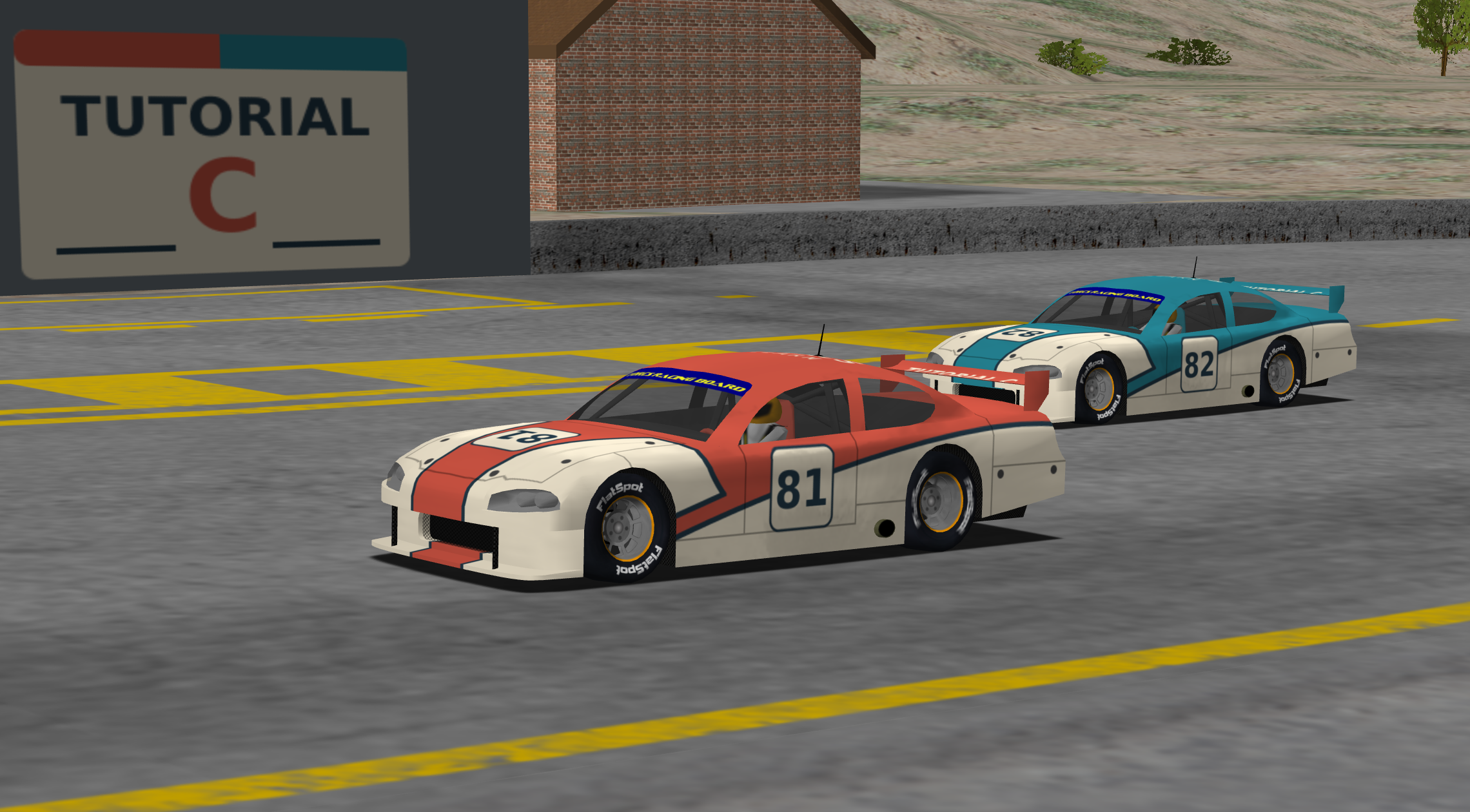
Red (81) and Teal (82) use individual liveries and a common team pit sign. Click the image to enlarge it.
| Identifier | Red | Teal | Meaning |
|---|---|---|---|
| Registration-array slot | modInfo[0] | modInfo[1] | Position in this module's metadata array |
| Exported robot index | 1 | 2 | Stable identity passed to this module's callbacks |
| XML section | Robots/index/1 | Robots/index/2 | Description matched to that exported index |
| Painted/XML race number | 81 | 82 | Display identification; not a callback-routing key |
There is also car->index, the engine's per-race car identifier: its original slot in carList. It depends on the selected field and initialization order, then stays with that car during the race. The situation->cars[] list can be reordered as race positions change. Neither that list position nor car->index is this module's robot index. When Teal runs alone, its car->index is 0 while its robot index is still 2. That is why the first exercise starts with Teal alone.
The engine stores the robot identity as car->_driverIndex. For the driving, new-race, pit-command, and shutdown callbacks, it passes the index stored in the robot interface. Our initializer must therefore set itf->index correctly as well as publishing modInfo[slot].index.
This example chooses consecutive indices 1 and 2 and maps them to storage slots 0 and 1. Index 0 is used by some other modules; our choice is not a universal TORCS numbering rule. The current interface provides up to ten registration slots. If you choose nonconsecutive indices, use an explicit mapping rather than assuming every module can use index - 1.
In Appendix B, the module's single robot used file-scope controller objects. Simply adding a second registration would make both cars use those same objects: one car's newRace could reset the other's pit plan, and alternating driving calls could mix their fuel observations.
driver.h now groups the state into a TutorialDriver class. Each object owns:
| Member | What must stay independent |
|---|---|
| index | The robot's stable registration identity |
| configuration | Loaded lookahead and strategy parameters |
| speed | Gear-change timing, target speed, car-dependent estimates |
| recovery | Recovery mode, elapsed stuck time, previous update time |
| traffic | Opponent observations, selected passing car, offset and manoeuvre state |
| pits | Route, mode, requests, visits, consumption measurements and merge state |
| currentTrack, activeCar | Borrowed references identifying this object's current session and car |
The methods in driver.cpp contain the integrated driving logic. The ordinary driving, recovery, traffic, and pit helpers are still separate files. Their state becomes independent because each TutorialDriver owns its own helper objects; the driving algorithm itself does not need a second copy of its source code.
The engine owns car, track, parameter, and pit-assignment structures. Our class does not delete them. A shared pit can legitimately give two objects the same borrowed ownPit pointer while their routes, fuel estimates, and decisions remain separate. Each driving callback writes its own car's controls.
The exported tutorialc entry point fills two tModInfo records. Both use the same initInterface function, with different indices and names. The remaining records are zeroed. The description XML supplies matching Robots/index/1 and Robots/index/2 entries, with distinct names and race numbers.
Registration is discovery metadata, not race initialization. Do not reset all driver objects in the module entry point: discovery and loading can revisit a module while another selected interface already has state. The entry point also does not know which robots will actually be selected for a race.
The registry is:
Initially both pointers are empty. std::unique_ptr expresses ownership: one registry entry owns one object, and destroying or resetting that pointer destroys the object and its owned containers. C++14 provides std::make_unique for creating the object. No manual new/delete pairing is required in the callback wrappers.
The index check is centralized:
getDriver uses that slot to return the selected object's pointer, or nullptr for an invalid or uninitialized entry. Every wrapper follows the same pattern:
The wrapper selects the owner; the class method performs the driving. The method also checks that the supplied car matches its activeCar. This helps keep an incorrectly routed call from using another car's controller state.
A non-static member function needs an object (this), so it cannot be assigned directly to the ordinary rbDrive function pointer. The wrapper supplies the bridge from TORCS's callback signature to the selected object's method.
initInterface validates the index and interface pointer, creates only that selected instance, assigns the callback pointers, and sets itf->index. Both robots use the same wrapper functions; the index chooses their different objects. Adding registration records without matching XML entries, or forgetting the interface index, is not a complete multi-robot implementation.
Register each module/index pair once in a race. Repeating the same pair in an edited race file would route both cars to the same registry entry. A second car needs its own registered identity.
| Stage | What happens in this checkpoint |
|---|---|
| Module discovery | Publish names, interface initializer, and indices; create no driver objects |
| initInterface(index, ...) | Create the selected TutorialDriver(index) and fill its interface |
| rbNewTrack | Reset this instance's controllers, borrow the track, and load its settings |
| rbNewRace | Associate the car, configure helpers from the effective car handle, then apply private settings |
| rbDrive | Dispatch to this instance and coordinate its controllers |
| rbPitCmd | Produce this instance's fuel/repair commands and update its service state |
| rbShutdown | Reset this instance's owning pointer; leave other entries alone |
The configuration ordering inside newRace matters: pits.configure resets the pit helper, so configuration.apply comes afterward. This is the same ordering explained in Appendix A, now performed separately for each selected object.
The current engine calls rbShutdown during driver cleanup after a race, before releasing the car parameter handles and unloading the race's modules. The registry entry becomes empty again. A new selected interface gets a fresh object even if the shared library remains loaded. Do not use module unloading as the only way to reset per-race state.
The current engine does not call rbEndRace. The checkpoint leaves that optional callback null and relies on the actual shutdown lifecycle. An empty registry entry can be reset again safely; shutting down Red must not destroy Teal.
The metadata strings are a separate ownership matter. This module uses strdup for the names and descriptions handed to tModInfo; the module loader frees those copies. Do not also free them from each robot's shutdown callback. Temporary setup handles are released by our settings loader, returned physical overrides are consumed by the engine, and the class keeps copied private values. See Appendix A for the parameter-handle lifecycle.
For two robots, a fixed array of whole driver objects could also work if each slot were reset correctly. The owning-pointer version constructs only selected robots and scales better when a driver later owns large path or learning data.
The shared runtime files are under drivers/tutorialc/. Per-robot files are under drivers/tutorialc/1/ and drivers/tutorialc/2/. The numbers are the exported indices, not the displayed race numbers 81 and 82.
For each recognized setting, loadSettings(index, ...) applies:
Later valid values override earlier ones. Missing keys retain earlier values. Each call starts afresh; it does not inherit whichever robot was configured last. The physical-setting whitelist and numeric validation from Appendix A still apply, as does the final fuel fallback on tracks without supported side pits.
This precedence is our driver's policy. In particular, an individual default overrides a module-level track setting. For an illustrative lookahead base of 8 m in the module defaults, 9 m in the module track file, 10 m in Red's defaults, and 11 m in Red's track file, Red gets 11 m. If Teal's individual files omit that key, Teal gets 9 m. The supplied individual files are empty sparse layers, so both initially retain the module baseline of 8 m.
Replace the contents of your working 2/g-track-1.xml with:
Save, leave the session, install, and begin a 12-lap race with both robots. Teal should start at about 4 litres and make fuel-driven stops. Red retains the 60-litre racing configuration. View each car's fuel display near the start to confirm which file was applied.
Red's parameter values remain unchanged, but its lap times or pit-entry timing can change in response to Teal's driving. That is interaction through the race, not shared C++ state. A test for isolation must distinguish those two effects.
Restore Teal's sparse file after this exercise. No C++ rebuild is required for these XML edits; both platform installation rules include the individual files.
The renderer loads 1/car1-stock1.rgb for Red and 2/car1-stock1.rgb for Teal, using the index-specific search described in Appendix B. Each has a complete editable XCF and decal SVG under artwork/1/ or artwork/2/. The painted numbers 81 and 82 match the description XML but remain separate artwork.
The shared logo.rgb and its artwork/logo.svg source stay at module level. Both XML entries use the exact team name Tutorial C Team. A single-car pit falls back to that module logo, and a shared pit selects the module logo directly. There is no need to duplicate it in both individual directories.
Inspect both cars in the same graphical session. Changing the viewed car should switch the displayed name and show the corresponding colour and number. Reversing the race list must not swap their paint. The common logo should still identify the team if the pit is shared. Follow Appendix B's export/install workflow for artwork edits and retain ARTWORK.txt with the sources.
Independent driver objects can share a physical resource. The track assigns pit boxes; the engine records occupancy. Each robot observes the assigned box through its own borrowed pit pointer. Two robots sharing a box must not both be serviced there at once.
The default Quick Race setting is one car per pit. To try sharing:
This file configures the race manager, unlike the driver settings under drivers/tutorialc/. A new session reloads our private driver files, but for this manual race-manager edit we close and reopen the game.
The engine's occupancy flag says whether the box is in use now. It does not reserve the box for a car still approaching. The inherited pit controller checks occupancy before beginning an approach; if another car takes the box after entry, it limits speed and waits before the capture region. Its front-traffic checks still apply. After the occupant is released, the waiting car can continue when its path clears.
The supplied driver does not implement a team scheduler. It can defer an approach because of traffic, and two independent fuel plans can create a queue. Allow fuel margin and observe the actual delay. A possible extension is a team coordinator that explicitly reserves service order, releases reservations on cancellation or retirement, and considers remaining fuel. That would be intentionally shared state with a defined owner, not an accidental shared PitDriver object.
Keep the reference car and track. Use Red first and Teal second in the driver list, allow two cars per pit, and configure 12 laps. In the individual track files, use these values:
| Setting | Red: 1/g-track-1.xml | Teal: 2/g-track-1.xml |
|---|---|---|
| Car/initial fuel | 5 l | 4 l |
| Tutorial C/Strategy/demonstration stop | no | no |
| Tutorial C/Strategy/stint laps | 4 | 3 |
Use the XML structure from the previous exercise; stint laps is an attnum inside the existing Strategy subsection. Leave other parameters at their baseline values. Install and start a new session.
Before running, predict which robot will need fuel first and which will make more visits. Record each robot's starting fuel, pit visits, fuel remaining, damage, and classification. Watch any waiting at the shared box. The six-lap full-tank run is the simpler comparison if a strategy experiment becomes difficult to interpret.
Teal's shorter stints can mean more pit visits and a lower finishing position. Once the leader finishes, a lapped car can finish its race on its current lap: for example, Red may complete 12 laps while Teal is classified with 11. Both drivers finishing the race does not necessarily mean both complete the configured lap count. Compare fuel remaining and pit visits as well as position.
You have completed the exercise when either robot works alone, both work together in either selection order, edits reach the intended robot, shutdown/restart gives fresh state, and you can explain their behavior at a shared pit. Restore the supplied sparse overrides when you want to return to the racing baseline.
| Symptom | Check |
|---|---|
| Only one robot appears | Both tModInfo records and matching description XML sections must exist |
| Teal fails when selected alone | Do not use car->index to select Drivers; Teal's robot index remains 2 |
| Settings seem to belong to the other robot | Check callback routing, stored index, and individual directory names |
| Editing a module track file has no effect | An individual default or track file may override that key |
| A recovery or service resets both cars | Look for shared mutable state, including function-local statics |
| The second robot stops after the first shuts down | Destroy only the indexed owning pointer |
| Cleanup code never runs | Do not rely on rbEndRace; use the supported shutdown lifecycle |
| Both cars have the same paint | Check installed 1/ and 2/ images, exported indices, and a new graphical session |
| Same team but separate boxes | The race's cars-per-pit allowance must also permit sharing |
| A shared-pit strategy is delayed | Occupancy and nearby traffic affect entry; independence is not a service reservation |
| A new individual file is missing after installation | Update its subdirectory Makefile and the Windows installation Copy list |
tutorialc.cpp contains metadata, instance ownership, and callback wrappers. driver.h/.cpp contain the per-robot class and integrated control flow. settings.cpp applies the five-stage per-key configuration policy. The inherited helper files implement speed, steering, geometry, braking, recovery, traffic, pit routing, and splines. The root and individual Makefiles, Windows project, description XML, settings, artwork, and licenses are all included in the archive.
You started with a stationary module and made it drive, recover, choose speeds, steer toward a target, share the road, and use the pits. You then separated setup from source code, gave the driver recognizable artwork, and put two independently owned robots into one module.
Keep the supplied checkpoints as reference points. For your next experiment, choose one measurable question: a better trajectory, more reliable recovery, less conservative traffic prediction, or coordinated pit strategy. State the assumptions, change one thing, and compare complete runs as well as individual moments. Preserve useful mathematics and explain where its model stops matching the simulator.
Share your observations or ask for help through the tutorial's community links. Return to the Robot Tutorial or Appendix B.
 1.14.0